When you are in the process of developing your page, you may not want the world to be able to view it until you are 100% comfortable that it is exactly what you want.
To ensure that your page is private and not visible to the public while you are creating it, enable page protection by setting up a password for your Biolink page.
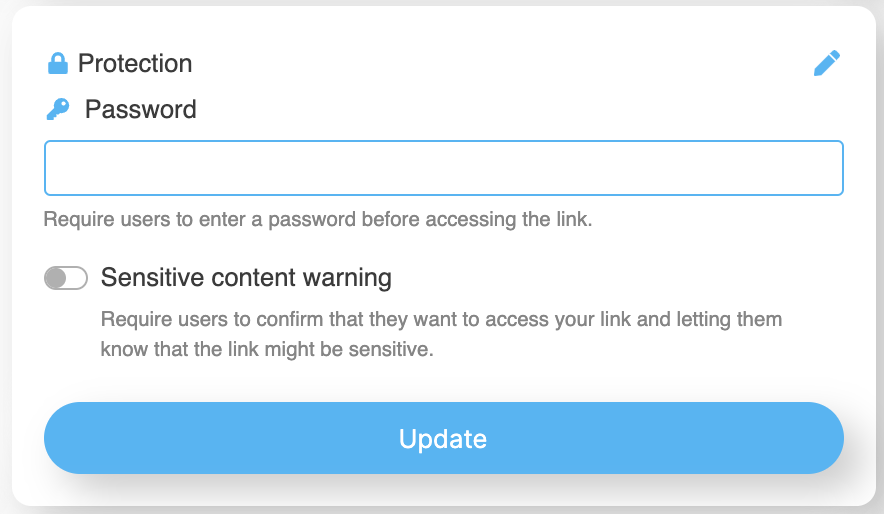
To add a password to you Biolink page, open the “Protection” section on your LinkBossPro Biolink page settings.
Enter a password and click “Update” when done in order to set your page to private.
Your page will now be password protected until you are ready to share your link and have your audience, customers, or fans access your Biolink page.
Remember, only people with the password will be able to access your page. If you wish to share it publicly you must remove page protection and the password.
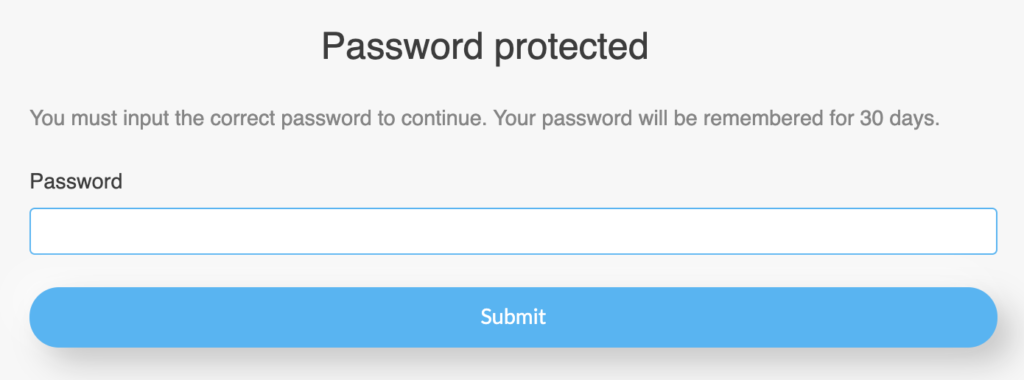
To check that page protection is active, copy your Biolink page link and paste it into your browser. You should see the message below. To access your Biolink page, enter your password and click “Submit”.
Still, need help?
If you have any additional questions about password protection or any other questions, please contact the LinkBossPro customer support team in the chat (blue icon in the bottom right corner) or check out more articles here in our blog or check our Youtube channel.
Alternatively you can email our support team via support@linkboss.pro
We use cookies on our website to give you the most relevant experience by remembering your preferences and repeat visits. By clicking “Accept”, you consent to the use of ALL the cookies.
This website uses cookies to improve your experience while you navigate through the website. Out of these, the cookies that are categorized as necessary are stored on your browser as they are essential for the working of basic functionalities of the website. We also use third-party cookies that help us analyze and understand how you use this website. These cookies will be stored in your browser only with your consent. You also have the option to opt-out of these cookies. But opting out of some of these cookies may affect your browsing experience.
Necessary cookies are absolutely essential for the website to function properly. This category only includes cookies that ensures basic functionalities and security features of the website. These cookies do not store any personal information.
Any cookies that may not be particularly necessary for the website to function and is used specifically to collect user personal data via analytics, ads, other embedded contents are termed as non-necessary cookies. It is mandatory to procure user consent prior to running these cookies on your website.